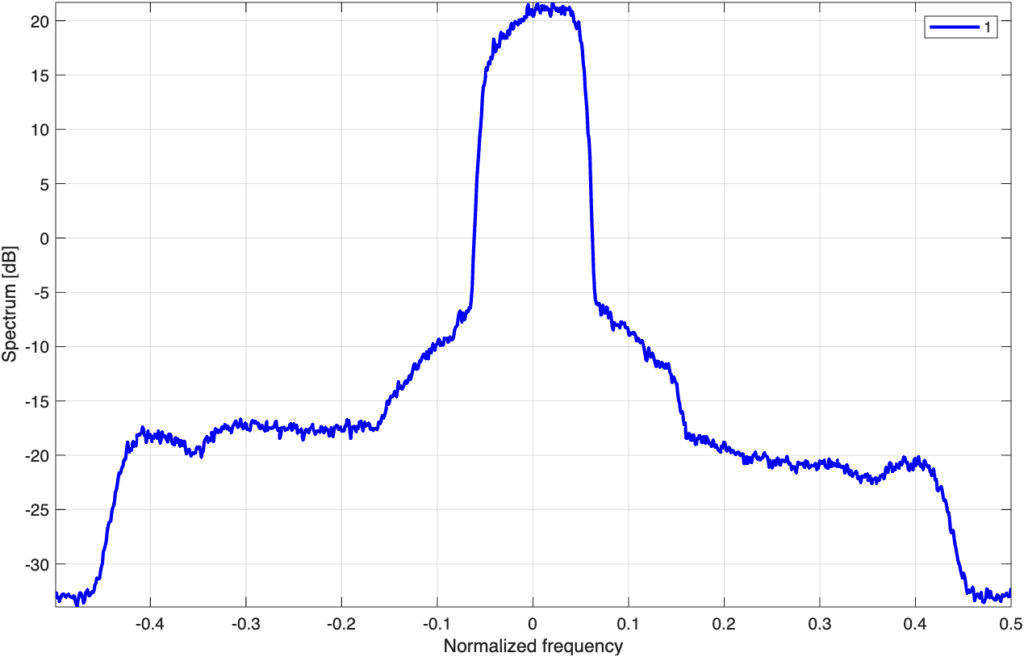
On this page you will find the Matlab scripts that generate the interferer/blocker, that generate the desired signal, that calculate the score and a Matlab file containing the currently uploaded interferer. The interferer will always be present and is in the middle of the band. See Fig. 1 for an example of its spectrum, present on the output of the PA in the desired signal path. You have no control over the interferer, however you will have full control over the desired signal and its power level. Note that there are cable length differences between the interferer’s path and the desired signal path.
Your goal is to get the best ACPR and NMSE for a target output power level of 37 dBm.
Use the following Matlab functions version 1.1 (01052026):
To create the desired signal: generate_desired_signal_v1_1.m
To create the interferer: generate_blocker_v1_1.m
To calculate the score (compiled): IMS2026_score_v1_1.p
To calculate the score (explanation, non-functional):IMS2026_score_v1_1_explanation.m
Competition example to run the client: example_RFWebLab_IMS2026_PA_meas_v1_1.m
The currently active blocker (010526) is: interferer.mat
To run the client, please see access details.
Important notices:
1) The server currently swaps the I and Q signal. In the example we swap them back. A new client will be released that fixes this, however this may only happen by the end of May. As always, this will be announced in the news section on this website.
2) Sometimes the data returned by the client is scaled incorrectly. I suggest to remeasure when excessive power levels are detected. This happens randomly, its root cause is currently not understood.
3) There are three moments the score will be recorded, see rules and procedures.
We intend to run the competition according to these procedures (Version: May 1st 2026):
If anything is unclear, or you would like to discuss some aspects of the competition, please contact us at: sdc@dpdcompetition.com.